Global Black-and-White Thresholding
Applies a histogram-based thresholding algorithm to convert a grayscale image into a binary (black-and-white) result and writes it to the Selection or Mask layer.
Overview
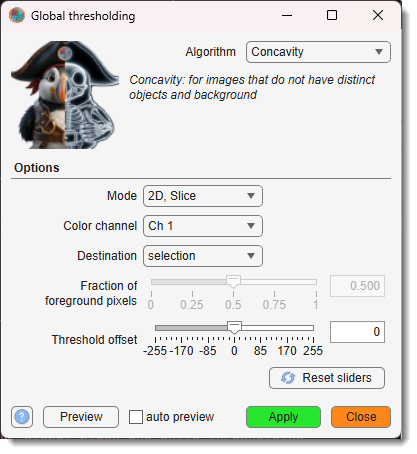
Accessible via Ribbon → Tools → Semi-automatic segmentation → Global thresholding.
Twelve algorithms are available, each suited to different image characteristics. The result is written to the Selection or Mask layer depending on the setting.
Global black and white thresholding in MIB
Note
Most algorithms are optimised for 8-bit images. For 16-bit data the image is
normalised to 8-bit per slice before thresholding (Otsu uses the full bit depth via MATLAB's
graythresh).
Controls
- : thresholding method to use (see Algorithms below for descriptions of each).
Options panel
- : dataset extent to process — 2D, Slice (current slice only), 3D, Stack (all slices in the current Z-stack), or 4D, Dataset (all slices and time points).
- : color channel used for thresholding.
- : layer that receives the binary result — selection or mask.
- + slider: fraction of pixels assumed to belong to the foreground (0–1). Active only for the Percentile algorithm.
- + slider: integer offset added to the computed threshold — positive raises it (fewer foreground pixels), negative lowers it (more foreground pixels).
-
: resets Fraction of foreground pixels to 0.5 and Threshold offset to 0.
-
: updates the Selection layer automatically after each widget change (current slice only).
- : applies thresholding to the current slice and shows the result in the Selection layer without committing to the chosen scope.
- : applies thresholding to the full selected scope.
- : closes the dialog.
Algorithms
Concavity
Suitable when images lack distinct objects and background, making MINIMUM and INTERMODES algorithms ineffective:
- Constructs the convex hull H of the histogram y
- Finds local maxima of |H − y|
- Sets threshold t to the value of j maximising the balance measure bj = Aj(An − Aj)
References
- A. Rosenfeld and P. De La Torre, "Histogram concavity analysis as an aid in threshold selection," IEEE Trans. Systems Man Cybernet., vol. 13, pp. 231–235, 1983
- Based on the HistThresh Toolbox by Antti Niemistö, Tampere University of Technology
Entropy
A maximum entropy method that splits the histogram into two probability distributions (objects / background):
- Sets threshold t to maximise the sum of entropies of those distributions:
(Ej / Aj) − log(Aj) + ((En − Ej) / (An − Aj)) − log(An − Aj)
References
- J. N. Kapur, P. K. Sahoo, and A. K. C. Wong, "A new method for gray-level picture thresholding using the entropy of the histogram," Comput. Vision Graphics Image Process., vol. 29, pp. 273–285, 1985
- Based on the HistThresh Toolbox by Antti Niemistö, Tampere University of Technology
InterMeans iter
An iterative algorithm (similar to Otsu but less computationally intensive):
- Starts with an initial threshold t; iteratively updates t = ⌊(μt + νt) / 2⌋ until convergence
- Results may depend on the initial t value
- Use Mean for comparable object and background areas; InterModes for small objects
References
- T. Ridler and S. Calvard, "Picture thresholding using an iterative selection method," IEEE Trans. Systems Man Cybernet., vol. 8, pp. 630–632, 1978
- H. J. Trussell, IEEE Trans. Systems Man Cybernet., vol. 9, p. 311, 1979
- Based on the HistThresh Toolbox by Antti Niemistö, Tampere University of Technology
InterModes
Assumes a bimodal histogram — an alternative to Minimum:
- Identifies two peaks yj and yk and sets t = (j + k) / 2
- Unsuitable for histograms with extremely unequal peaks
References
- J. M. S. Prewitt and M. L. Mendelsohn, "The analysis of cell images," Ann. New York Acad. Sci., vol. 128, pp. 1035–1053, 1966
- Based on the HistThresh Toolbox by Antti Niemistö, Tampere University of Technology
Mean
Sets t to the integer part of the mean of all pixel values: t = Bn / An.
Does not take histogram shape into account — often yields suboptimal results.
References
- Based on the HistThresh Toolbox by Antti Niemistö, Tampere University of Technology
Median
Sets t to the median of all pixel values (equivalent to Percentile with Fraction = 0.5).
Does not take histogram shape into account.
References
- W. Doyle, "Operation useful for similarity-invariant pattern recognition," J. Assoc. Comput. Mach., vol. 9, pp. 259–267, 1962
- Based on the HistThresh Toolbox by Antti Niemistö, Tampere University of Technology
MinError
Assumes a Gaussian mixture model and minimises classification error:
- Allows different means and variances for objects and background
- Sets t to minimise pj log(σj / pj) + qj log(τj / qj)
References
- J. Kittler and J. Illingworth, "Minimum error thresholding," Pattern Recognition, vol. 19, pp. 41–47, 1986
- Based on the HistThresh Toolbox by Antti Niemistö, Tampere University of Technology
MinError iter
Iterative version of MinError — less computationally intensive:
- Initialises t using Mean and iterates until convergence
- Fails if the resulting quadratic equation has no real solution
References
- J. Kittler and J. Illingworth, "Minimum error thresholding," Pattern Recognition, vol. 19, pp. 41–47, 1986
- Based on the HistThresh Toolbox by Antti Niemistö, Tampere University of Technology
Minimum
Assumes a bimodal histogram:
- Smooths the histogram with a three-point mean filter until only two local maxima remain
- Chooses t at the valley between them (yt−1 > yt < yt+1)
- Unsuitable for histograms with unequal peaks or a broad, flat valley
References
- J. M. S. Prewitt and M. L. Mendelsohn, "The analysis of cell images," Ann. New York Acad. Sci., vol. 128, pp. 1035–1053, 1966
- Based on the HistThresh Toolbox by Antti Niemistö, Tampere University of Technology
Moments
Moment-preserving thresholding — sets t such that the first three moments of the gray-level image are preserved in the thresholded binary result.
References
- W. Tsai, "Moment-preserving thresholding: a new approach," Comput. Vision Graphics Image Process., vol. 29, pp. 377–393, 1985
- Based on the HistThresh Toolbox by Antti Niemistö, Tampere University of Technology
Otsu
Implemented via MATLAB's graythresh. Calculates an optimal threshold to minimise intra-class intensity variance. Works with the full bit depth of the image.
References
- N. Otsu, "A Threshold Selection Method from Gray-Level Histograms," IEEE Trans. Systems Man Cybernet., vol. 9, no. 1, pp. 62–66, 1979
Percentile
Assumes that the fraction of foreground pixels is known:
- Sets t to the highest gray-level such that at least (1 − Fraction) of pixels map to background
- Configure via (default 0.5 = Median)
References
- W. Doyle, "Operation useful for similarity-invariant pattern recognition," J. Assoc. Comput. Mach., vol. 9, pp. 259–267, 1962
- Based on the HistThresh Toolbox by Antti Niemistö, Tampere University of Technology
Batch scripting
This tool supports batch scripting for automation.
Example
BatchOpt.Algorithm    = {'Otsu'};        % thresholding algorithm
BatchOpt.Mode         = {'3D, Stack'};   % '2D, Slice' | '3D, Stack' | '4D, Dataset'
BatchOpt.ColorChannel = {'Ch 1'};        % color channel
BatchOpt.Destination  = {'selection'};   % 'selection' | 'mask'
% Optional range limiters:
BatchOpt.t = [1 1];      % time points [t1, t2]
BatchOpt.z = [10 20];    % slices [z1, z2]
BatchOpt.x = [10 120];   % x crop [x1, x2]
% Percentile-specific:
BatchOpt.ForegroundFraction = {0.3, [0 1], 'off'};
% Threshold fine-tuning:
BatchOpt.ThresholdOffset = {5, [-Inf Inf], 'on'};

obj.mibController.startController('controllers.GlobalThresholding', [], BatchOpt);
Back to MIB | User interface | Ribbon | Tools