Content-aware Fill
Back to MIB | User interface | Ribbon | Image
Overview
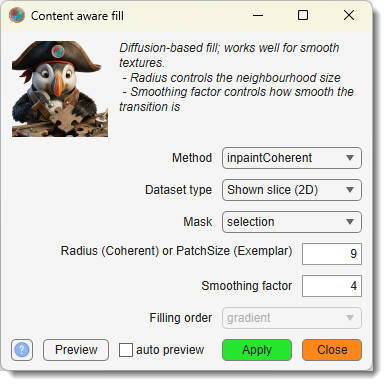
Reconstruct selected areas of the dataset using information from neighboring regions, modifying the image and corresponding Selection, Mask, and Labels layers.
Mark the regions to fill using the Mask or Selection layers in the Segmentation panel,
then open the dialog from Ribbon → Image → Image tools → Content-aware fill.
Settings
: fill algorithm — inpaintCoherent or inpaintExemplar.
: scope of the operation — Shown slice (2D), Current stack (3D), or Complete volume (4D).
: layer that defines the fill region — selection or mask.
: for inpaintCoherent — neighbourhood radius (pixels) centred on each pixel to inpaint; for inpaintExemplar — patch size in pixels.
(inpaintCoherent only): Gaussian filter scale for estimating the coherence direction; controls smoothness of the result (0 = no smoothing).
(inpaintExemplar only): priority function determining which pixels are filled first — gradient (edge-first) or tensor.
Use to apply the fill to the current slice and inspect the result before committing to the full dataset. Enable to update the preview automatically whenever a parameter changes.
inpaintCoherent
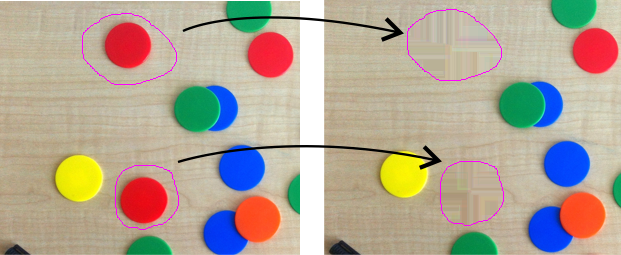
Restores regions using coherence transport-based inpainting — propagates edge direction and intensity from surrounding areas into the selected region. Works well for smooth textures and gradients. Available from MATLAB R2019a.
Method-specific parameters:
- : neighbourhood radius (pixels) around each pixel to inpaint; larger values use more context.
- : controls how smoothly the coherence direction is estimated.
Reference
- F. Bornemann and T. März, "Fast Image Inpainting Based on Coherence Transport," Journal of Mathematical Imaging and Vision, Vol. 28, 2007, pp. 259–278.
- inpaintCoherent at MathWorks
inpaintExemplar
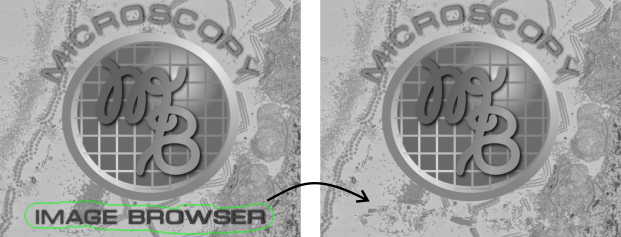
Fills regions by copying and blending texture patches from nearby areas. Works well for repetitive textures and structured backgrounds. Available from MATLAB R2019b.
Method-specific parameters:
- : patch size in pixels (e.g.
9for a 9×9 patch). - : determines which pixels are filled first —
gradientprioritises strong edges;tensoruses the local structure tensor.
Reference
- A. Criminisi, P. Perez, and K. Toyama, "Region Filling and Object Removal by Exemplar-Based Image Inpainting," IEEE Trans. on Image Processing, Vol. 13, No. 9, 2004, pp. 1200–1212.
- inpaintExemplar at MathWorks
Back to MIB | User interface | Ribbon | Image