GUI Tutorial (Batch)
Overview
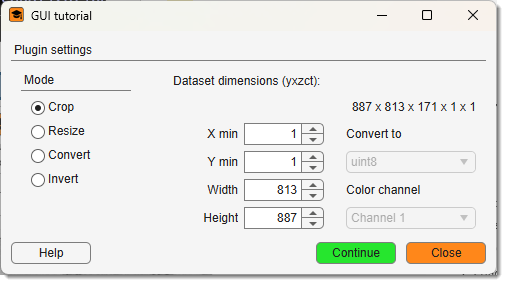
GuiTutorialBatch extends GuiTutorial with full batch-processing support. It performs the same four operations (Crop, Resize, Convert, Invert), but every parameter is stored in a BatchOpt struct so the plugin can run from a Batch Processing protocol, be recorded and replayed as a macro, and run headless without a GUI.
Access it via Ribbon → Plugins → Tutorials → GuiTutorialBatch. Source: mib/plugins/Tutorials/GuiTutorialBatch/.
Read these first
GuiTutorial teaches the four operations and basic GUI structure; Demo Plugin teaches the BatchOpt system on a minimal example. This plugin combines both.
Three calling modes
utils.startController calls the constructor differently depending on the mode. The constructor inspects nargin and varargin{2}:
| Mode | Call | Behaviour |
|---|---|---|
| Interactive | GuiTutorialBatch(mibModel) |
builds the GUI |
| Headless / batch | GuiTutorialBatch(mibModel, parentObj, BatchOpt) |
runs silently, no GUI |
| Query | GuiTutorialBatch(mibModel, parentObj, NaN) |
returns default BatchOpt to the batch controller, runs nothing |
% Interactive (from the ribbon):
utils.startController(parentObj, 'plugins.Tutorials.GuiTutorialBatch.GuiTutorialBatch');

% Headless batch:
BatchOpt.OperationButtonGroup = {'cropRadio'};
BatchOpt.xMinEdit   = {10,  [1 50000], 'on'};
BatchOpt.yMinEdit   = {10,  [1 50000], 'on'};
BatchOpt.widthEdit  = {200, [1 50000], 'on'};
BatchOpt.heightEdit = {200, [1 50000], 'on'};
GuiTutorialBatch(mibModel, parentObj, BatchOpt);
The BatchOpt structure
BatchOpt is the single source of truth for every tunable parameter. Each field name must exactly match the Tag of its AppDesigner widget (case-sensitive) — the shared sync utilities locate widgets by Tag, so a mismatch silently skips the widget.
| Widget type | BatchOpt field format |
|---|---|
uicheckbox |
logical (true / false) |
uidropdown |
{selectedString, {'opt1','opt2',…}} — element 2 optional |
uibuttongroup |
{selectedRadioTag, {'Tag1','Tag2',…}} — element 2 is documentation only |
uispinner |
{value, [min max], 'on'/'off'} — 'on' = integer rounding |
Defaults defined in the constructor (Step 1)
% Radio group (Tag = 'OperationButtonGroup')
obj.BatchOpt.OperationButtonGroup{1} = 'cropRadio';
obj.BatchOpt.OperationButtonGroup{2} = {'cropRadio','resizeRadio','convertRadio','invertRadio'};

% Spinners — shared by Crop and Resize. Upper limit 50000 lets Resize upscale.
obj.BatchOpt.xMinEdit   = {1,   [1 50000], 'on'};
obj.BatchOpt.yMinEdit   = {1,   [1 50000], 'on'};
obj.BatchOpt.widthEdit  = {512, [1 50000], 'on'};
obj.BatchOpt.heightEdit = {512, [1 50000], 'on'};

% Dropdowns
obj.BatchOpt.convertDropdown = {'uint8', {'uint8','uint16'}};
obj.BatchOpt.colorDropdown   = {'Channel 1', {'Channel 1'}};   % rebuilt per dataset

obj.BatchOpt.showWaitbar = true;
obj.BatchOpt.id = obj.mibModel.getActiveId();   % NOT a widget; stripped before recording
Batch registration metadata (Step 2)
obj.BatchOpt.mibBatchSectionName = 'Ribbon -> Plugins';   % category in the Batch Processing menu
obj.BatchOpt.mibBatchActionName  = 'GuiTutorial Batch';   % label for this action
obj.BatchOpt.mibBatchTooltip.xMinEdit = 'Crop: left edge X coordinate (1-based, pixels)';
% ... one tooltip per field ...
To make the plugin selectable in the Batch Processing dialog, register it in controllers.BatchProcessing.initialize:
obj.Sections(secIndex).Actions(actionId).Name = 'GuiTutorial Batch';
obj.Sections(secIndex).Actions(actionId).Command = ...
    'obj.mibController.startController(''plugins.Tutorials.GuiTutorialBatch.GuiTutorialBatch'', [], Batch);';
actionId = actionId + 1;
Constructor flow
The constructor runs four steps: (1) define BatchOpt defaults, (2) set batch metadata, (3) branch into headless/query mode when a 3rd argument is present, (4) otherwise build the interactive GUI.
Step 3 — headless / query branch
if nargin == 3
    BatchOptIn = varargin{2};
    if ~isstruct(BatchOptIn)
        if isscalar(BatchOptIn) && isnan(BatchOptIn)
            obj.returnBatchOpt();               % query mode: advertise parameters
        else
            utils.dlgs.showErrorDialog([], 'A BatchOpt structure is required as the 3rd argument.', 'BatchOpt Error');
            notify(obj.mibModel, 'StopProtocol');
        end
        notify(obj, 'CloseEvent'); return
    end
    % Merge caller fields over defaults (absent fields keep defaults).
    obj.BatchOpt = utils.updateBatchOptCombineFields_Shared(obj.BatchOpt, BatchOptIn);
    obj.normalizeBatchOptForCurrentDataset();   % validate channel list / operation enum
    if isempty(obj.BatchOpt)
        notify(obj.mibModel, 'StopProtocol'); notify(obj, 'CloseEvent'); return;
    end
    obj.Calculate();
    notify(obj, 'CloseEvent');
    return;
end
Step 4 — interactive GUI (same pattern as GuiTutorial)
obj.view = core.ChildView(obj, 'GuiTutorialBatchGUI');
% icon + utils.moveWindowOutside + utils.fontSizeUpdate (see GuiTutorial)
obj.view.gui.CloseRequestFcn = @(~,~) obj.closeWindow();
obj.updateWidgets();
obj.listener{1} = addlistener(obj.mibModel, 'UpdateGuiWidgets', @(s,e) obj.ViewListner_Callback2(obj, s, e));
obj.listener{2} = addlistener(obj.mibModel, 'NewDataset',       @(s,e) obj.ViewListner_Callback2(obj, s, e));
In batch mode obj.view stays []. Every method that touches widgets begins with if isempty(obj.view); return; end, and ViewListner_Callback2 has the same guard.
GUI ↔ BatchOpt synchronisation
Unlike GuiTutorial (which writes widget properties directly), the batch plugin keeps BatchOpt and the widgets in sync through two shared utilities:
updateWidgetsupdates data-dependent fields (spinner defaults, channel list) then pushes all ofBatchOptinto the widgets in one pass:updateBatchOptFromGUIpulls a changed widget value back intoBatchOpt. Wire it as theValueChangedFcnof every interactive widget:
mlapp callback wiring
% every value widget:
function widthEdit_ValueChanged(app, event)
    app.winController.updateBatchOptFromGUI(event);
end
% the radio group — update BatchOpt, then refresh enable states:
function OperationButtonGroup_SelectionChanged(app, event)
    app.winController.updateBatchOptFromGUI(event);
    app.winController.buttonGroup_Callback();
end
buttonGroup_Callback reads the selection directly from ButtonGroup.SelectedObject.Tag, so it is authoritative regardless of child order.
Calculate — dispatch + macro recording
Calculate is the single entry point shared by the Continue button and headless mode. Each operation method reads its inputs from BatchOpt (not from widgets) and returns a boolean, so a failed run is not recorded.
Calculate
function Calculate(obj)
    obj.BatchOpt.id = obj.mibModel.getActiveId();   % refresh for headless mode
    id = obj.BatchOpt.id;

    % Guard: this plugin needs in-memory pixels.
    if strcmp(obj.mibModel.I{id}.datasetType, 'Virtual')
        % warn via utils.dlgs.inputUniversalDlg, then:
        notify(obj.mibModel, 'StopProtocol'); return;
    end

    success = false;
    switch obj.BatchOpt.OperationButtonGroup{1}
        case 'cropRadio';    success = obj.cropDataset();
        case 'resizeRadio';  success = obj.resizeDataset();
        case 'convertRadio'; success = obj.convertDataset();
        case 'invertRadio';  success = obj.invertDataset();
    end

    if success
        obj.returnBatchOpt();                 % record in the macro
    elseif isempty(obj.view)
        notify(obj.mibModel, 'StopProtocol'); % headless failure halts the protocol
    end
end
returnBatchOpt strips the session-specific id and fires SyncBatch so the batch controller can record the operation:
function returnBatchOpt(obj, BatchOptOut)
    if nargin < 2; BatchOptOut = obj.BatchOpt; end
    if isfield(BatchOptOut, 'id'); BatchOptOut = rmfield(BatchOptOut, 'id'); end
    notify(obj.mibModel, 'SyncBatch', core.ToggleEventData(BatchOptOut));
end
The four operation methods are the same as in GuiTutorial, with two differences: they read inputs from BatchOpt, and Convert/Invert use core.PoolWaitbar (instead of uiprogressdlg) so progress works in batch mode.
Headless-mode helpers
Two private helpers handle the GUI-vs-headless split:
getDialogParent— returnsobj.view.guiin interactive mode, elseobj.mibModel.mibGUI. Safe forutils.dlgs.*anduiprogressdlg(both accept an AppContainer), but not forcore.PoolWaitbar.canShowWaitbar—trueonly whenBatchOpt.showWaitbaris set and a real pluginUIFigureexists.core.PoolWaitbarrequires amatlab.ui.Figure, which the AppContainer is not; in batch mode progress is shown by the Batch Processing GUI.normalizeBatchOptForCurrentDataset— in headless modeupdateWidgetsnever runs, so this revalidates dynamic fields (channel list, operation enum) after merging the caller'sBatchOpt; it setsobj.BatchOpt = []to signal an unrecoverable error.
Adapting it to your own plugin
- Copy the
GuiTutorialBatch/folder undermib/plugins/<YourSection>/and rename the folder, the.m, and the.mlappto<YourName>(class name = folder name). - Redefine the
BatchOptfields to match your widgets'Tags, and update themibBatchTooltipentries. - Replace the operation methods with your own logic (keep the boolean return so macro recording works).
- Wire each widget's
ValueChangedFcntoupdateBatchOptFromGUI, and the button group additionally tobuttonGroup_Callback. - Register the action in
controllers.BatchProcessing.initialize(see above) if you want it in the Batch Processing dialog. - Restart MIB.
Credits
Author: Ilya Belevich, University of Helsinki (ilya.belevich@helsinki.fi) · Part of Microscopy Image Browser
Back to MIB | User Interface | Plugins | Tutorials