GUI Tutorial
Overview
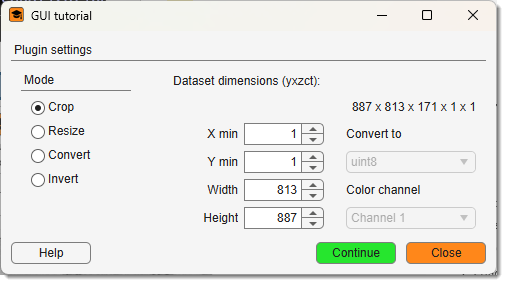
GuiTutorial is the reference example for building an AppDesigner-based GUI plugin for MIB3. It applies four operations to the current dataset:
- Crop — crop to a specified XY rectangle
- Resize — resize to new XY dimensions
- Convert — convert the image class between
uint8anduint16 - Invert — invert a selected colour channel
Access it via Ribbon → Plugins → Tutorials → GuiTutorial. The source is in mib/plugins/Tutorials/GuiTutorial/.
Where to go next
Once you understand this plugin, see GUI Tutorial (Batch) to add batch-processing / macro support, and Demo Plugin for a minimal BatchOpt widget example. The canonical reference is mib/plugins/plugins_instructions.md in the source tree.
Files
An MIB3 GUI plugin lives in mib/plugins/<Section>/<Name>/ and the class name equals the folder name (no Controller suffix):
| File | Role |
|---|---|
GuiTutorial.m |
Controller — all logic, callbacks, data access |
GuiTutorialGUI.mlapp |
View — AppDesigner UI; delegates callbacks to the controller |
icon_24px.png / icon_16px.png |
ribbon-gallery and title-bar icons (fall back to the default MIB icon if absent) |
MIB discovers the plugin automatically by scanning mib/plugins/ at startup (addRibbonPlugins.m) — no manual registration.
The View (GuiTutorialGUI.mlapp)
In AppDesigner, the only manual additions to a generated app are:
- A public property to hold the controller:
- A constructor that accepts
vararginand passes it torunStartupFcn. - A
startupFcnthat stores the controller: - Each component callback delegates to the matching controller method:
Give every widget a meaningful Tag (widthEdit, colorDropdown, cropRadio, …). core.ChildView collects all named component properties into obj.view.handles, so the controller addresses them as obj.view.handles.<Tag>.
The Controller (GuiTutorial.m)
Class skeleton
classdef GuiTutorial < handle
    properties
        mibModel            % handle to MibModel — central application state
        view                % core.ChildView wrapper (.gui and .handles)
        listener            % cell array of event listeners (deleted on close)
        childControllers    = {}   % open child controllers (e.g. ResampleDataset)
        childControllersIds = {}   % matching class names (used by utils.startController)
    end
    events
        CloseEvent          % fired by closeWindow() after the GUI is destroyed
    end
    methods (Static)
        function ViewListner_Callback2(obj, ~, evnt)
            switch evnt.EventName
                case {'UpdateGuiWidgets', 'NewDataset'}
                    obj.updateWidgets();
            end
        end
    end
    methods
        % constructor + action methods ...
    end
end
ViewListner_Callback2 is static so the listener holds a weak reference to obj and does not block garbage collection.
Constructor
The constructor builds the view, positions and themes the window, then wires events.
Constructor
function obj = GuiTutorial(mibModel, varargin)
    obj.mibModel = mibModel;

    % Build the view: instantiates GuiTutorialGUI(obj), runs its
    % startupFcn, and populates obj.view.handles from the mlapp components.
    obj.view = core.ChildView(obj, 'GuiTutorialGUI');

    % Place the window to the left of the main MIB window.
    obj.view.gui = utils.moveWindowOutside(obj.view.gui, obj.mibModel.mibGUI, 'left');

    % Title-bar icon: plugin-local icon, else the shared MIB icon.
    pluginDir    = fileparts(mfilename('fullpath'));
    localIcon    = fullfile(pluginDir, 'icon_16px.png');
    fallbackIcon = fullfile(obj.mibModel.mibPath, 'assets', 'icons', 'mib_icon_16px.png');
    if isfile(localIcon);        obj.view.gui.Icon = localIcon;
    elseif isfile(fallbackIcon); obj.view.gui.Icon = fallbackIcon; end

    % Match the global MIB font (only if it differs).
    Font = obj.mibModel.preferences.System.Font;
    if obj.view.handles.infoText1.FontSize ~= Font.FontSize || ...
            ~strcmp(obj.view.handles.infoText1.FontName, Font.FontName)
        utils.fontSizeUpdate(obj.view.gui, Font);
    end

    % Route the window X button to closeWindow().
    obj.view.gui.CloseRequestFcn = @(~,~) obj.closeWindow();

    % Static widget setup + initial state.
    obj.view.handles.convertDropdown.Items = {'uint8', 'uint16'};
    obj.view.handles.cropRadio.Value = true;

    % Populate data-dependent widgets, then subscribe to MIB events.
    obj.updateWidgets();
    obj.listener{1} = addlistener(obj.mibModel, 'UpdateGuiWidgets', ...
        @(src, evnt) obj.ViewListner_Callback2(obj, src, evnt));
    obj.listener{2} = addlistener(obj.mibModel, 'NewDataset', ...
        @(src, evnt) obj.ViewListner_Callback2(obj, src, evnt));
end
Always accept varargin
The second constructor argument is unused here but must be accepted so the controller is compatible with utils.startController and batch-mode callers.
closeWindow
Order matters: close children → clear CloseRequestFcn before deleting the figure (prevents a recursive close) → delete listeners → fire CloseEvent.
closeWindow
function closeWindow(obj)
    for i = numel(obj.childControllers):-1:1   % reverse: avoids index shift
        child = obj.childControllers{i};
        if isa(child, 'handle') && isvalid(child)
            child.closeWindow();
        end
    end
    obj.childControllers    = {};
    obj.childControllersIds = {};

    if isvalid(obj.view.gui)
        obj.view.gui.CloseRequestFcn = '';  % prevent recursive close
        delete(obj.view.gui);
    end
    for i = 1:numel(obj.listener); delete(obj.listener{i}); end
    notify(obj, 'CloseEvent');
end
updateWidgets
Refreshes all data-dependent widgets from the current dataset. Called from the constructor and from ViewListner_Callback2 whenever MIB fires UpdateGuiWidgets or NewDataset.
id = obj.mibModel.getActiveId();                 % never use obj.mibModel.id directly
options.blockModeSwitch = 0;                      % full image, ignore viewport crop
[height, width, depth, colors, time] = ...
    obj.mibModel.I{id}.getDatasetDimensions('image', 3, options);   % orient 3 = XY
% ... fill spinners with full extents, build the channel dropdown, then:
obj.buttonGroup_Callback();   % apply enable/disable rules for the active operation
Enable/disable per operation
buttonGroup_Callback enables only the widgets relevant to the selected radio button (Crop needs origin+size; Resize needs size; Convert needs target class; Invert needs the channel). It takes no event argument, so it can be called both from the mlapp SelectionChangedFcn and directly from updateWidgets.
Dispatching the operation
function continueBtn_Callback(obj)
    if     obj.view.handles.cropRadio.Value;    obj.cropDataset();
    elseif obj.view.handles.resizeRadio.Value;  obj.resizeDataset();
    elseif obj.view.handles.convertRadio.Value; obj.convertDataset();
    elseif obj.view.handles.invertRadio.Value;  obj.invertDataset();
    end
end
The four operations — key MIB3 API
Each operation illustrates a different data-access pattern. The active id is always read with obj.mibModel.getActiveId().
Crop — MibDataset.cropDataset
setData4D cannot change dimensions, so crop delegates to the built-in API, which handles all layers (image, labels, mask, selection) and the bounding box in one call.
cropF = [x1, y1, width1, height1, 1, depth, 1, time];   % [x1 y1 dx dy z1 dz t1 dt]
cropOpts.showWaitbar = true;
cropOpts.UIFigure    = obj.view.gui;                    % progress-dialog parent
result = obj.mibModel.I{id}.cropDataset(cropF, cropOpts);
if result
    notify(obj.mibModel, 'NewDataset');                 % dimensions changed
    notify(obj.mibModel, 'ShowImage');                  % redraw
end
Resize — controllers.ResampleDataset in batch mode
Resizing also cannot use setData4D. The plugin launches ResampleDataset silently via utils.startController, which resamples every layer and fires NewDataset + ShowImage on completion.
BatchOpt.ResamplingMode = {'Dimensions'};        % absolute pixel target
BatchOpt.DimensionX     = num2str(width1);        % strings — ResampleDataset parses text fields
BatchOpt.DimensionY     = num2str(height1);
utils.startController(obj, 'controllers.ResampleDataset', [], BatchOpt);
Convert — direct write to MibImage.data
A class change cannot go through setData4D either: MibImage.setData writes via indexed assignment (obj.data(...) = dataset), which silently casts back to the container's original type. Instead, write the new typed array directly and update the three interdependent metadata properties.
convertDataset (core)
options.blockModeSwitch = 0;
img       = obj.mibModel.getData4D('image', [], [], options);  % img{1} is the matrix
classFrom = class(img{1});
% scale to fill the target type's full range: coef = intmax(target)/intmax(source)
coef   = double(intmax('uint16')) / double(intmax(class(img{1})));
img{1} = uint16(double(img{1}) * coef);

imageObj           = obj.mibModel.I{id}.image;
imageObj.data      = img{1};                       % bypass setData
imageObj.dataClass = class(img{1});                % 'uint8' / 'uint16'
imageObj.maxInt    = double(intmax(class(img{1})));
imageObj.getDefaultViewPort();                     % reset display range
notify(obj.mibModel, 'UpdateGuiWidgets');
notify(obj.mibModel, 'ShowImage');
Invert — per-slice getData2D / setData2D
Processing one 2-D slice at a time keeps peak memory low for large datasets. The full 3-D volume is backed up first (skipped for time series to avoid a huge undo snapshot).
invertDataset (core)
colCh   = find(strcmp(obj.view.handles.colorDropdown.Items, colChStr), 1);
options = struct();                 % no ROI, no viewport crop
[~, ~, depth, ~, time] = obj.mibModel.I{id}.getDatasetDimensions('image');
if time == 1; obj.mibModel.backup('image', 1, struct()); end

for t = 1:time
    for z = 1:depth
        img    = obj.mibModel.getData2D('image', z, [], colCh, options);  % returns a cell
        maxInt = intmax(class(img{1}));
        for r = 1:numel(img); img{r} = maxInt - img{r}; end
        obj.mibModel.setData2D(img, 'image', z, [], colCh, options);
    end
end
obj.mibModel.I{id}.image.updateActionLog('Invert image');
notify(obj.mibModel, 'ShowImage');
getData / setData cheatsheet
getData2D(type, slice, orient, col, opts)/getData4D(type, orient, col, opts)—typefirst; returns a cell (img{1}is the matrix; in ROI mode one entry per ROI).setData2D(dataset, type, slice, orient, col, opts)— dataset first (MIB2 had type first).- Use
[](notNaN) for the current slice/orientation; orient3= native XY.
Adapting it to your own plugin
- Create
mib/plugins/<YourSection>/<YourName>/. - Add
icon_24px.pngandicon_16px.png(optional but recommended). - Copy
GuiTutorialGUI.mlappandGuiTutorial.min, then rename both to<YourName>(class name must equal the folder name). - In the controller, replace the four action methods with your own logic and adjust which
MibModelevents you listen to. - Restart MIB — your plugin appears under
Ribbon → Plugins → <YourSection> → <YourName>.
Back to MIB | User Interface | Plugins | Tutorials