MIB Panels
Overview
Microscopy Image Browser (MIB) provides a set of panels to assist with image processing, segmentation, and analysis.
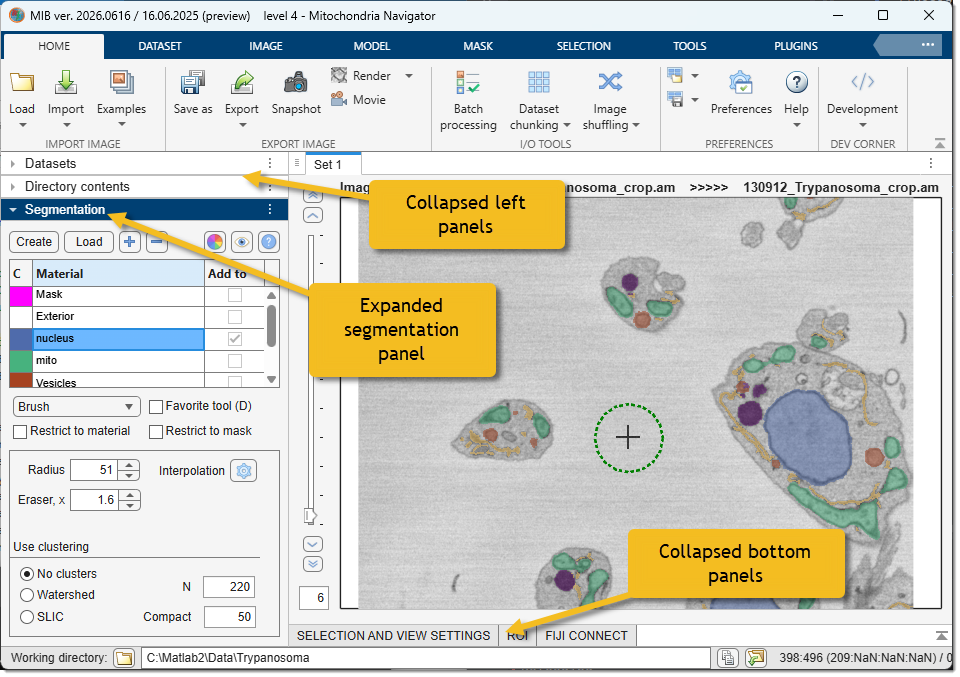
MIB3 is built on MATLAB's AppContainer framework, which gives every panel a consistent set of layout controls:
- Resizable — drag any panel border to redistribute space between panels.
- Collapsible — click the panel title bar to collapse it to a slim strip, freeing space for the image area.
- Moveable — panels can be dragged to any edge of the MIB window, rearranged, or floated as independent windows, letting you build a layout optimised for your screen and workflow.
Panels
- Datasets: manage up to 10 open dataset buffers per set; switch between them, duplicate, sync or link views, and set the memory access mode.
- Directory Contents: navigate your files and folders, select images to load, options to switch between interchangeable panels using dropdown menus.
- Segmentation: suite of tools for segmenting images, including 3D ball, brush, and advanced AI-based segmentation (e.g., Segment Anything Model).
- Selection and View Settings: manipulate the Selection layer (add, subtract, replace, erode, dilate) and control layer visibility, color channels, and contrast.
- ROIs: define and manage Regions of Interest for focused analysis or measurements.
- Fiji Connect: integrate with Fiji (ImageJ) for additional processing capabilities, bridging MIB with external tools.
Back to MIB | User interface