Morphological 2D/3D Operations
Overview
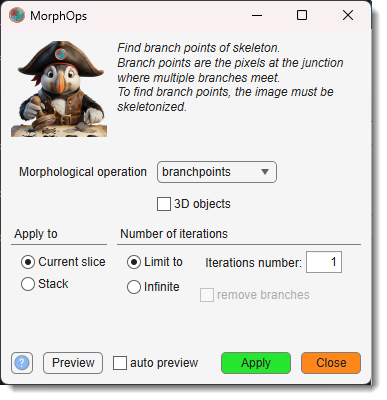
Applies morphological operations to the Selection layer using MATLAB's bwmorph, bwmorph3, bwskel, and bwulterode functions.
The available operations depend on the checkbox — switching it repopulates the dropdown with the operations relevant to the chosen dimensionality.
Demonstration
Skeleton for 3D objects
Controls
-
: the operation to apply (see 2D operations and 3D operations below).
-
: when checked, uses 3D operations (
bwmorph3/bwskel); when unchecked, uses 2D operations (bwmorph). Switching repopulates . -
(2D mode only):
- Current slice — applies the operation to the currently displayed slice.
- Stack — applies to every slice in the Z-stack.
-
Iterations:
- N / : choose a fixed iteration count or run until convergence. For Skeleton, only Limit to is available and the value is used as Min branch length. For 3D operations other than Skeleton, iterations are not applicable and these controls are disabled.
- / : the spinner value (label changes based on the selected operation).
-
: removes small branches after thinning or skeletonisation. Available for Skeleton (2D) and Thin with Infinite iterations (2D).
-
Ultimate erosion panel (visible only when bwulterode is selected in 2D mode):
- / : selects the connectivity dimension for the erosion.
- :
4or8in 2D mode;6,18, or26in 3D mode. - : distance metric —
euclidean,cityblock,chessboard, orquasi-euclidean.
-
(2D mode only): updates the preview automatically on every widget change.
- (2D mode only): overlays the result on the current view without committing changes.
- : applies the operation to the Selection layer.
- : closes the dialog without making changes.
2D operations
Available when is unchecked.
Branch points
branchpoints — finds branch points (junctions) of a skeleton:
- Pixels where multiple skeleton branches meet are set to 1; all others to 0.
- The image must be skeletonised first.
- Reference: bwmorph
Diagonal fill
diag — eliminates 8-connectivity of the background using diagonal fill:
- Fills diagonal gaps so that background regions lose 8-connectivity:
1 0 → 1 1/0 1 → 1 1 - Reference: bwmorph
Endpoints
endpoints — finds end points of a skeleton:
- Pixels with only one 8-connected neighbour are set to 1.
- Reference: bwmorph
Skeleton
skel — reduces objects to 1-pixel-wide skeletons using bwskel:
- Removes boundary pixels without breaking connectivity; preserves the Euler number.
- The Limit to value is used as Min branch length (branches shorter than this are pruned).
- applies additional branch removal after skeletonisation.
- Reference: bwskel
Demo
Spur
spur — removes spur pixels (pixels with exactly one 8-connected neighbour):
- Cleans up isolated line endpoints produced by skeletonisation or thinning.
- Reference: bwmorph
Thin
thin — thins objects to lines:
- Objects without holes shrink to minimally connected strokes; objects with holes shrink to rings.
- Preserves the Euler number.
- With Infinite iterations and checked, small branches are removed from the result.
- Reference: bwmorph
Demo
Ultimate erosion
bwulterode — reduces objects to their ultimate eroded points (local maxima of the distance transform):
- Each connected object is reduced to one or more isolated representative pixels.
- Configure the erosion via the Ultimate erosion panel:
- Mode (2D / 3D) and Connectivity control how neighbourhoods are defined.
- Method selects the distance metric (
euclidean,cityblock,chessboard,quasi-euclidean).
- Reference: bwulterode
3D operations
Available when is checked. All operations process the full 3D stack; Apply to is fixed to Stack. Iterations are not applicable except for Skeleton.
Branch points
branchpoints — finds branch points of a 3D skeleton:
- Voxels at skeleton junctions are set to 1; all others to 0.
- The volume must be skeletonised first.
- Reference: bwmorph3
Clean
clean — removes isolated voxels:
- An isolated voxel is a single voxel set to 1 completely surrounded by voxels set to 0.
- Reference: bwmorph3
Endpoints
endpoints — finds end points of a 3D skeleton:
- Voxels with only one 26-connected neighbour are set to 1.
- Reference: bwmorph3
Fill
fill — fills isolated interior voxels:
- Isolated interior voxels (set to 0 and surrounded 6-connected by voxels set to 1) are set to 1.
- Reference: bwmorph3
Majority
majority — keeps a voxel set to 1 only if the majority of its neighbourhood is 1:
- A voxel stays 1 if ≥ 14 of the 26 voxels in its 3×3×3 neighbourhood are 1; otherwise set to 0.
- Reference: bwmorph3
Remove
remove — removes interior voxels:
- Interior voxels (set to 1 and surrounded 6-connected by voxels set to 1) are set to 0, leaving only the object surface.
- Reference: bwmorph3
Skeleton
skel — reduces 3D objects to 1-voxel-wide skeletons using bwskel:
- The Limit to value is used as Min branch length; branches shorter than this are pruned.
- Reference: bwskel
Demo
Back to MIB | User interface | Ribbon | Selection