Normalize Layers
Back to MIB | User interface | Ribbon | Image
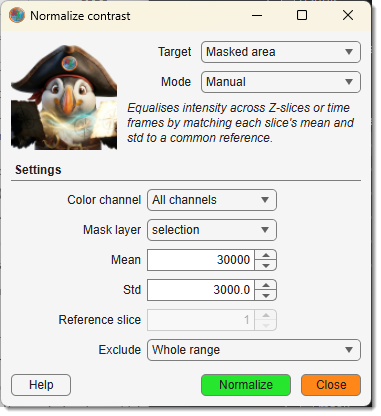
Normalizes image intensities slice-by-slice across Z or time to reduce illumination variation.
Demonstration
: what to normalize:
- Z stack: normalize each Z-slice to a common mean and standard deviation.
- Time series: normalize each time frame; controlled by — either Based on current 2D slice or Based on complete 3D stack.
- Masked area: compute normalization coefficients only from the masked region (see ).
- Background: shift each slice so that the mean intensity of the masked background area matches the dataset mean.
:
- Automatic: coefficients (mean and std) are computed from the data.
- Manual: use the fixed target and values.
- BasedOnSlice: use the slice specified by as the normalization reference.
: channels to normalize (All channels, Shown channels, or a specific channel).
: pixels to exclude from mean/std calculations — Whole range, Exclude blacks, or Exclude whites.
(Masked area / Background only): selection or mask layer used to define the region.
Normalization algorithm
- Calculate mean intensity and standard deviation (std) for the whole dataset.
- Calculate mean and std for each slice.
- Shift each slice by the difference between its mean and the dataset mean; stretch by the ratio of dataset std to slice std.
For 4D datasets, normalization can be done across time.
For Z-stacks, black or white pixels can be excluded from the statistics.
Back to MIB | User interface | Ribbon | Image