Debris Removal
Back to MIB | User interface | Ribbon | Image
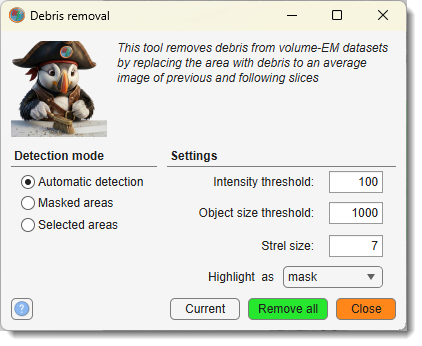
Automatically or manually restore areas of volumetric datasets corrupted by debris, replacing affected pixels with the average of the previous and following slices. Updates the image and the corresponding Selection, Mask, and Labels layers.
Limitations
- Debris removal is available for grayscale (single-channel) images only.
- The first and last slices of the stack are never processed — the algorithm needs one slice before and one slice after each target slice.
Settings
: how debris areas are identified — see sections below for details.
The following parameters are active for Automatic detection only:
- : threshold applied to the summed difference between a slice and its neighbours. Lower values detect larger regions.
- : minimum area (pixels) for a detected region to be considered debris; smaller objects are ignored.
- : radius of the disk structuring element (pixels) used for morphological refinement of the detected area.
- : layer used to mark detected debris —
maskorselection.
Click to process the current slice only, or to process the entire stack.
Automatic detection
Detects debris by comparing each slice to its neighbours:
- Computes the intensity difference between the current slice and its previous and following slices.
- Thresholds the summed difference using .
- Removes connected regions smaller than .
- Refines the mask with morphological operations (dilation → fill → erosion) controlled by .
- Replaces debris pixels with the average of the previous and following slices.
- Writes the detected area to the layer selected in .
Best for datasets with scattered artifacts (dust, staining residues) that were not pre-segmented.
Tip
Test on the current slice with before applying to the full stack.
Masked areas
Restores regions defined in the Mask layer. No detection parameters are required.
Use the Segmentation panel to paint or refine the Mask layer over the debris, then run debris removal. Each marked pixel is replaced with the average of the corresponding pixel in the previous and following slices.
Suitable when debris locations are already known and manually segmented.
Selected areas
Restores regions defined in the Selection layer. No detection parameters are required.
Define debris areas in the Selection layer using tools in the Segmentation panel. Processing is identical to the Masked areas mode.
Useful for quick interactive corrections during visual inspection without modifying the permanent Mask layer.
Example
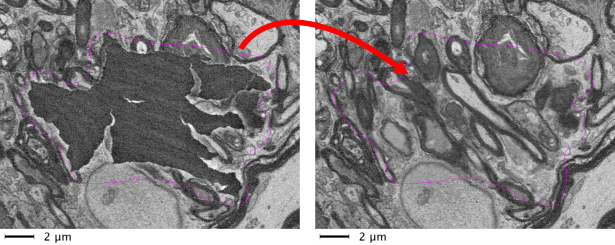
Debris removal applied to a volumetric dataset with automatic detection settings.
Back to MIB | User interface | Ribbon | Image