Demo Plugin (App Designer)
Overview
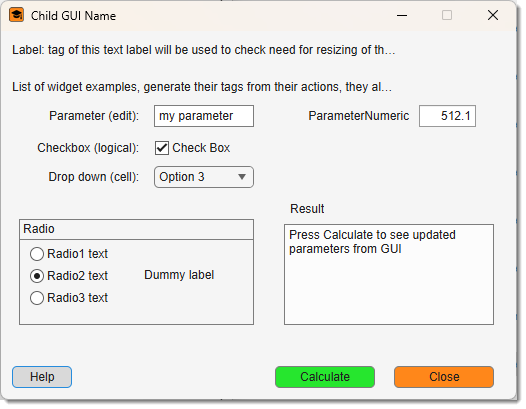
DemoPlugin is the minimal example of a batch-compatible AppDesigner plugin for Microscopy Image Browser (MIB3). It does no real image processing — instead it shows how every common widget type round-trips through a BatchOpt structure, and demonstrates the three calling modes that make a plugin usable from the Batch Processing dialog and from recorded macros.
Access it via Ribbon → Plugins → Tutorials → DemoPlugin. Source: mib/plugins/Tutorials/DemoPlugin/.
Where this fits
- GuiTutorial — basic GUI plugin with four real operations (no batch).
- DemoPlugin (this page) — the smallest possible
BatchOpt/ batch template. - GuiTutorial (Batch) — the four operations plus full batch support.
Five concepts it demonstrates
BatchOptstructure — one struct holds every parameter; field names match widgetTags.- GUI ↔ BatchOpt sync —
utils.updateGUIFromBatchOpt_Sharedandutils.updateBatchOptFromGUI_Shared. - Three calling modes — interactive, headless/batch, and query.
- Progress reporting —
core.PoolWaitbar(safe insideparfor). - Macro registration —
returnBatchOpt()firesSyncBatchso the run can be replayed.
Files
mib/plugins/Tutorials/DemoPlugin/
    DemoPlugin.m         ← controller
    DemoPluginGUI.mlapp  ← AppDesigner view
    icon_24px.png / icon_16px.png
The class name equals the folder name. For the view-side requirements (winController property, startupFcn, callbacks delegating to app.winController.<method>()) see GuiTutorial → The View.
The BatchOpt structure
Every tunable parameter is a field of obj.BatchOpt, and each field name must match the Tag of its AppDesigner widget exactly (case-sensitive). The shared utilities find widgets by Tag, so a mismatch silently skips the widget.
| Widget type | BatchOpt encoding |
|---|---|
uieditfield |
scalar string / char |
uicheckbox |
logical |
uidropdown |
{selectedString, {'opt1','opt2',…}} (element 2 optional) |
uibuttongroup |
{selectedRadioTag, {'Tag1','Tag2',…}} (element 2 metadata only) |
uispinner |
{value, [min max], 'on'/'off'} ('on' = round to integer) |
Defaults (constructor Step 1)
obj.BatchOpt.Parameter           = 'my parameter';                          % uieditfield
obj.BatchOpt.Checkbox            = true;                                     % uicheckbox
obj.BatchOpt.Dropdown{1}         = 'Option 3';                              % uidropdown
obj.BatchOpt.Dropdown{2}         = {'Option 1','Option 2','Option 3'};
obj.BatchOpt.RadioButtonGroup{1} = 'Radio2';                               % uibuttongroup
obj.BatchOpt.RadioButtonGroup{2} = {'Radio1','Radio2','Radio3'};
obj.BatchOpt.ParameterNumeric    = {512.125, [0 1024], 'off'};             % uispinner
obj.BatchOpt.showWaitbar         = true;
obj.BatchOpt.id = obj.mibModel.getActiveId();   % NOT a widget; stripped before recording
Batch metadata (constructor Step 2)
obj.BatchOpt.mibBatchSectionName = 'Ribbon -> Plugins';
obj.BatchOpt.mibBatchActionName  = 'Demo Plugin';
obj.BatchOpt.mibBatchTooltip.Parameter        = 'Text or numeric string';
obj.BatchOpt.mibBatchTooltip.Checkbox         = 'Logical flag (true / false)';
obj.BatchOpt.mibBatchTooltip.Dropdown         = 'Dropdown — pass a cell with the selected item string';
obj.BatchOpt.mibBatchTooltip.RadioButtonGroup = 'Radio group — pass a cell with the selected radio Tag';
obj.BatchOpt.mibBatchTooltip.ParameterNumeric = 'Numeric — pass a cell {value, [min max], roundFlag}';
obj.BatchOpt.mibBatchTooltip.showWaitbar      = 'Show or suppress the progress dialog';
Three calling modes
% Interactive (from the Plugins ribbon):
utils.startController(parentObj, 'DemoPlugin');

% Headless / batch (BatchOpt provided — e.g. macro replay):
BatchOpt.Parameter = 'hello';
BatchOpt.Checkbox  = false;
DemoPlugin(mibModel, parentObj, BatchOpt);

% Query mode — return default BatchOpt without executing:
DemoPlugin(mibModel, parentObj, NaN);
The constructor branches on a 3rd argument exactly like GuiTutorialBatch: a struct runs headless, NaN advertises parameters via returnBatchOpt, anything else is an error. With no 3rd argument it builds the GUI (core.ChildView, icon, utils.moveWindowOutside, utils.fontSizeUpdate, CloseRequestFcn, updateWidgets, listeners). In headless mode obj.view stays [].
The standard batch methods
updateWidgets — push BatchOpt into the GUI
updateBatchOptFromGUI — pull a changed widget into BatchOpt
function updateBatchOptFromGUI(obj, event)
    obj.BatchOpt = utils.updateBatchOptFromGUI_Shared(obj.BatchOpt, event.Source);
end
ValueChangedFcn of every interactive widget:
returnBatchOpt — register the run in the macro
Calculate
Calculate is where the real work would go. Here it reads every BatchOpt value, shows them in the GUI text area (interactive) or prints them to the command window (headless), and demonstrates a cancellable core.PoolWaitbar. It must end with returnBatchOpt() so the operation is recorded.
Calculate (essentials)
function Calculate(obj)
    obj.BatchOpt.id = obj.mibModel.getActiveId();
    id = obj.BatchOpt.id;

    if ~isempty(obj.view) && isvalid(obj.view.gui)
        progressParent = obj.view.gui;            % UIFigure for PoolWaitbar
    else
        progressParent = obj.mibModel.mibGUI;     % batch mode fallback
    end
    if obj.BatchOpt.showWaitbar
        progressBar = core.PoolWaitbar(3, 'Starting…', progressParent, 'Demo Plugin', true);
    end

    % Virtual-stack guard (remove if your plugin supports virtual stacks):
    if strcmp(obj.mibModel.I{id}.datasetType, 'Virtual')
        % warn, then:
        notify(obj.mibModel, 'StopProtocol');
        if obj.BatchOpt.showWaitbar; progressBar.deletePoolWaitbar(); end
        obj.closeWindow(); return;
    end

    % ... do the work; poll progressBar.getCancelState() between units ...

    if obj.BatchOpt.showWaitbar; progressBar.deletePoolWaitbar(); end
    % notify(obj.mibModel, 'ShowImage');   % if you changed image/labels/mask
    obj.returnBatchOpt();                  % MUST be last
end
PoolWaitbar needs a real figure
core.PoolWaitbar requires a matlab.ui.Figure. The main MIB window (mibModel.mibGUI) is an AppContainer, so a plugin-level progress bar is only shown when the plugin's own UIFigure exists. In headless mode progress is reported by the Batch Processing GUI instead.
Registering in the Batch Processing dialog
To make the plugin selectable in Batch Processing, add it to controllers.BatchProcessing.initialize:
obj.Sections(secIndex).Actions(actionId).Name    = 'Demo Plugin';
obj.Sections(secIndex).Actions(actionId).Command = 'obj.mibController.startController(''DemoPlugin'', [], Batch);';
actionId = actionId + 1;
Adapting it to your own plugin
- Copy
DemoPlugin/undermib/plugins/<YourSection>/, rename the folder,.m, and.mlappto<YourName>(class name = folder name). - In AppDesigner, lay out your widgets and set each one's Tag to match a
BatchOptfield name. - Redefine the
BatchOptdefaults andmibBatchTooltipentries for your widgets. - Wire each widget's
ValueChangedFcntoupdateBatchOptFromGUI. - Put your processing code in
Calculate, ending withreturnBatchOpt(). - Restart MIB — the plugin appears under
Ribbon → Plugins → <YourSection> → <YourName>.
Back to MIB | User Interface | Plugins | Tutorials