The 3D Ball Tool
BigData mode: supported
The 3D Ball tool works with BigData datasets (it reads/writes the full-resolution region around the ball).
3D ball overview
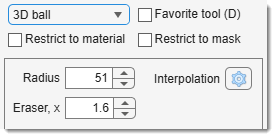
The 3D ball tool allows you to make a selection in the form of a spherical object in 3D space.
To use it, specify the radius in the edit box, which defines the sphere's size.
Larger radii result in larger selections.
The edit box modifies the eraser size multiplier.
When holding Ctrl and using the eraser (Ctrl +
Note
The aspect ratio for the depth size of the 3D ball is defined by pixel dimensions.
See Dataset Parameters in Ribbon → Dataset -> Parameters.
Selection modifiers
- None or +
: add 3D ball selection to the existing one. - +
: remove 3D ball selection from the current selection layer.
Presets
Use the following key shortcuts to define and restore presets
- Shift+1, Shift+2, Shift+3 - store preset 1, 2, or 3 correspondingly
- 1, 2, 3 - restore preset 1, 2, or 3 correspondingly
Back to MIB | User interface | Panels | Segmentation